Manage, filter, and export guests
- Manage all your guest data centrally in foratable and access guest profiles, visit history, and individual preferences at any time.
- Filter and segment your guests precisely by number of reservations, guest labels, or marketing consent.
- Export selected guest data for marketing campaigns, event invitations, or internal reports.
The guests is the second tab after Reservations and shows you a complete overview of all guests recorded in foratable.
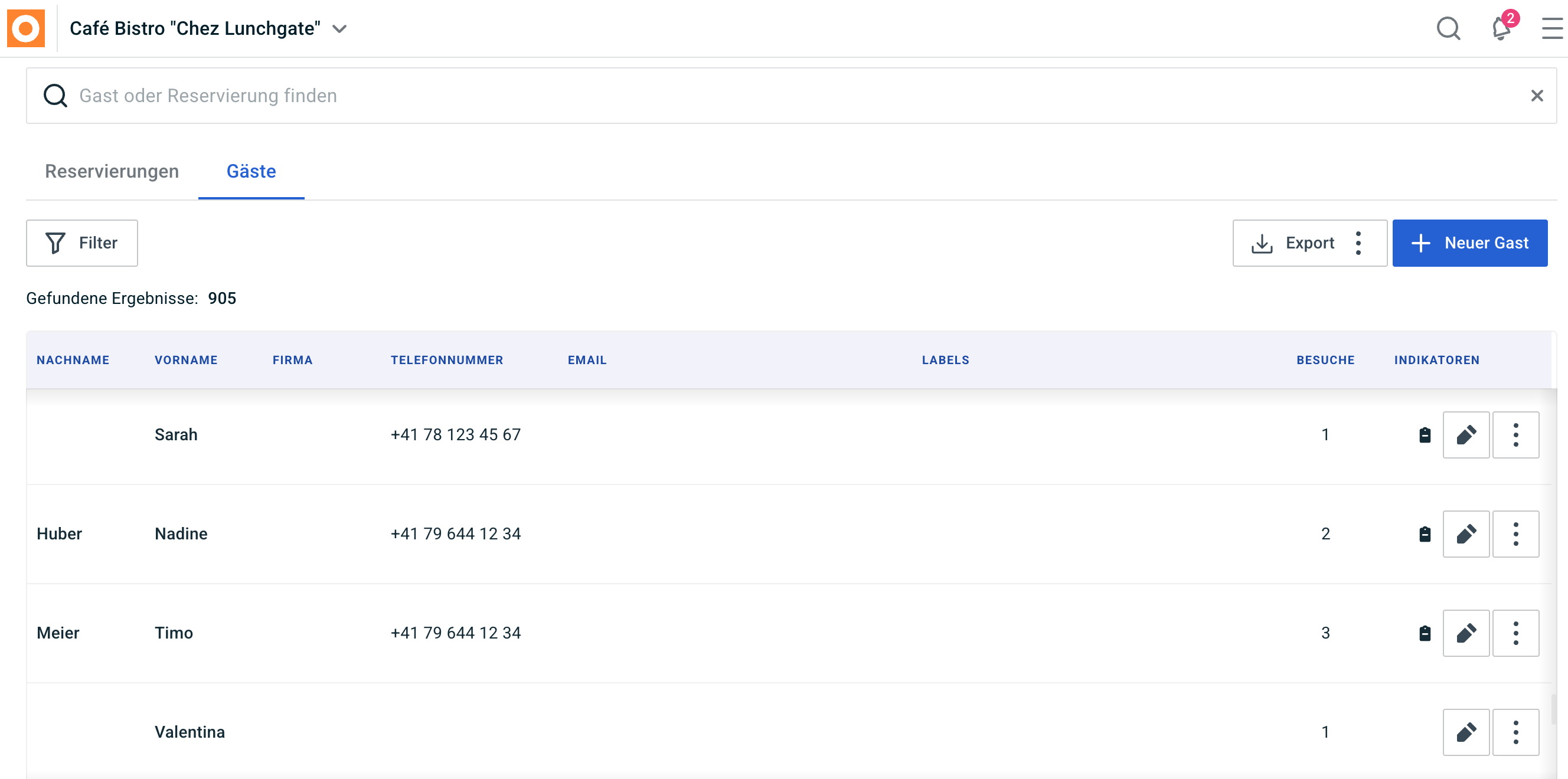
You can also think of this feature as a CRM – that is, Customer Relationship Management. This is where all relevant information and past interactions with your guests are brought together in one central place.
This allows you to recognize guests faster, track their history, and use your guest data effectively for more personalized service or marketing activities.
A. Searching for guests and opening profiles
Use the search function to look for a specific guest and open their corresponding guest profile directly.
In the guest profile, you will find the information and activities previously saved for that guest.
You can also create a new reservation directly from there without having to re-enter the guest's details.
B. Adding a new guest
If a guest is not yet in your database, you can add them as a new entry directly via the guest view.
We recommend capturing complete and accurate contact details whenever possible. This allows you to reuse the guest profile for future visits and keep your CRM clean.
C. Filtering guests
Various filters are available in the main overview.
You can use these to find specific guest groups and export them if needed.
Number of reservations
You can filter by the number of previous reservations.
You can either display all guests or define a specific minimum and maximum value.
This can be particularly useful for marketing activities.
Example:
If you want to invite your most loyal guests to an event, you can filter for guests with at least 3 reservations.
Guest labels
You can also filter guests specifically by Guest labels.
For example, you can search for the following groups:
- Regular guests
- VIP
- Business guests
- Wine lover
- Lunch guests
We explain how to use labels effectively for personalizing and segmenting your guests here:
Marketing consent
For marketing campaigns, it is particularly important that you also take into account the Marketing consent of your guests.
With this filter, you can specifically select which guests are registered for marketing communications.
This ensures that when you export, you only select guests who are relevant to your planned communication.
Created on
With the filter Created on you can search for when a guest profile was created.
This allows you, for example, to filter for all guests who were newly added to your guest database within a specific period.
D. Exporting guests
You can export your currently filtered selection and use it for further analysis or marketing activities.
This is suitable for, for example:
- Event invitations
- Information on new offers
- Campaigns for regular guests
- Targeted communication with specific guest groups
- Internal analysis
Use the filters before exporting to ensure you only select the guests relevant to your specific purpose.
E. What information can you see in the overview?
You get a lot of important information at a glance directly in the main overview.
This includes:
- Last name
- First name
- Company
- Phone number
- Email address
- Labels
- Visits
- Indicators
Visits
Under Visits you can see how often the guest has already visited your restaurant.
This allows you to quickly identify particularly loyal or returning guests.
Indicators
Under Indicators important information and notes stored at the guest level are displayed here.
These can include, for example:
- preferred seating
- dietary preferences
- Special requests
- other internal notes
This way, your team has valuable information at their fingertips before the next visit, allowing them to provide a more personalized guest experience.
Our recommendation
Use the guest view not just as an address book, but as a true CRM for your restaurant.
The better you maintain your guest profiles, the more effectively you can:
- recognize returning guests
- accommodate individual requests
- segment guests effectively
- prepare marketing campaigns
- make your guest experience more personal
The combination of guest labels, visit history, and marketing consent helps you use your guest data in a meaningful and targeted way.