POS integration with foratable
- Connect foratable to your POS system and reduce manual double entry
- Assign revenue and consumption details directly to your guests and enrich your guest CRM with valuable information
- Automate your table management by having tables automatically released once the payment process is complete
With a POS integration you connect your foratable reservation book directly to your POS system. This allows reservation, guest, and consumption data to be exchanged between both systems.
→ View available integrations in the Marketplace
Prefer a video?
→ To the webinar: Integrating foratable with Lightspeed K-Series (in German)
A. What are the benefits of the POS integration?
Connecting your reservation system with your POS system reduces manual work and automatically enriches your guest data with valuable information from their restaurant visit.
Depending on the connected POS system, you can, among other things:
- Transfer reservation data to the POS
- Synchronize check-ins with the POS system
- Assign revenue to a guest
- View consumption details in the guest profile
- Automatically release tables after the payment process is complete
This creates a seamless process from the initial reservation to the end of the restaurant visit.
B. From check-in to the POS
As soon as a guest arrives at the restaurant, you can check them in.
in foratable. With a connected POS integration, the relevant reservation information is transmitted to the POS system.
These can include, for example:
- First name and last name
- Phone number
- Email address
- Number of guests
- assigned table
This also directly links the reserved table to the corresponding guest or reservation within the POS system.
Your service team doesn't need to manually enter the information again.
C. Assign revenue directly to the guest
By connecting to your POS system, the revenue generated during a visit can be assigned to the corresponding guest profile in foratable.
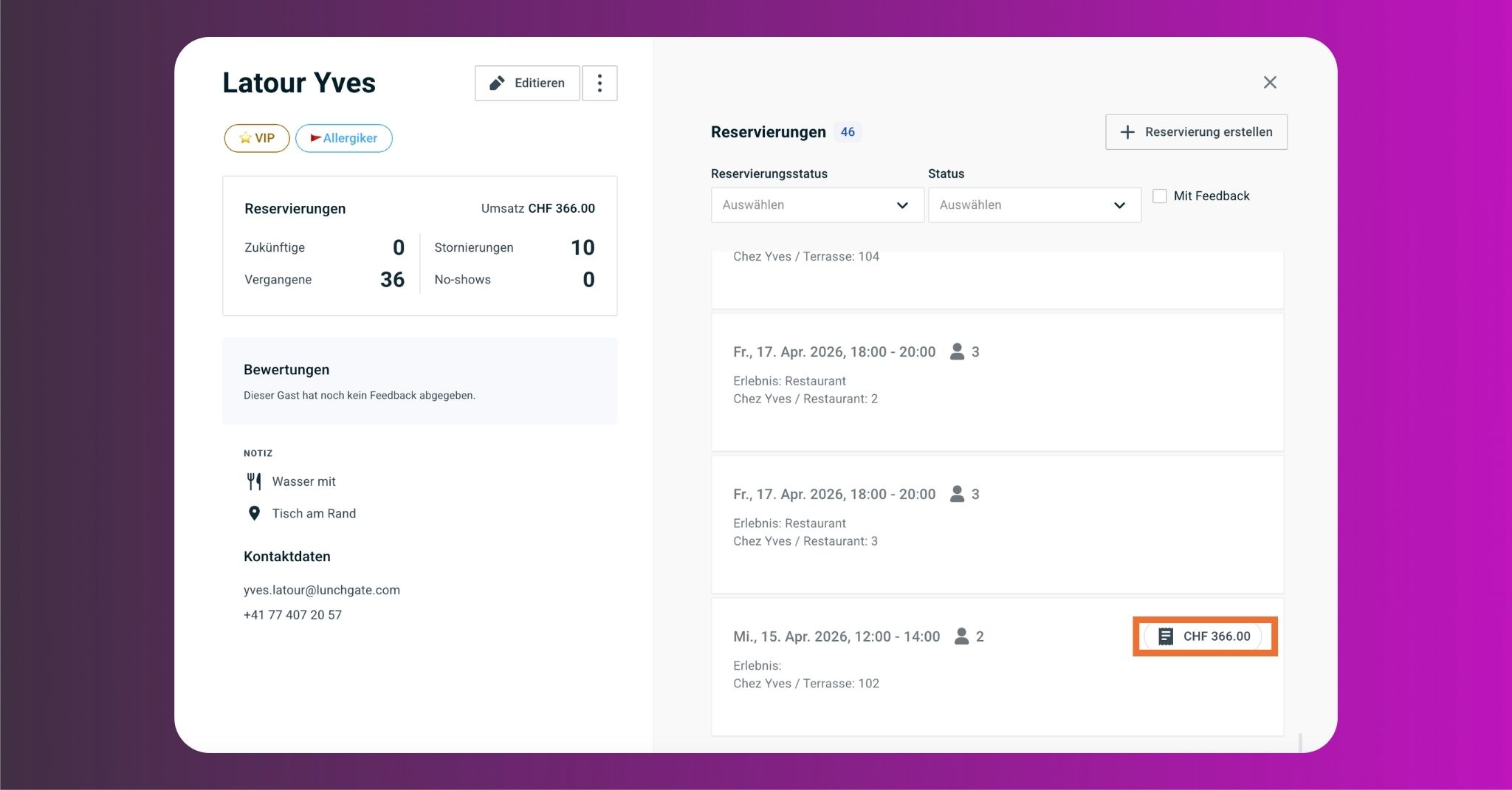
This allows you to see, for example, for a returning guest: how often they visit your restaurant and the total revenue they have generated so far.
This information enhances your guest CRM and helps you better identify your valuable regulars.
D. View consumption details in the guest profile
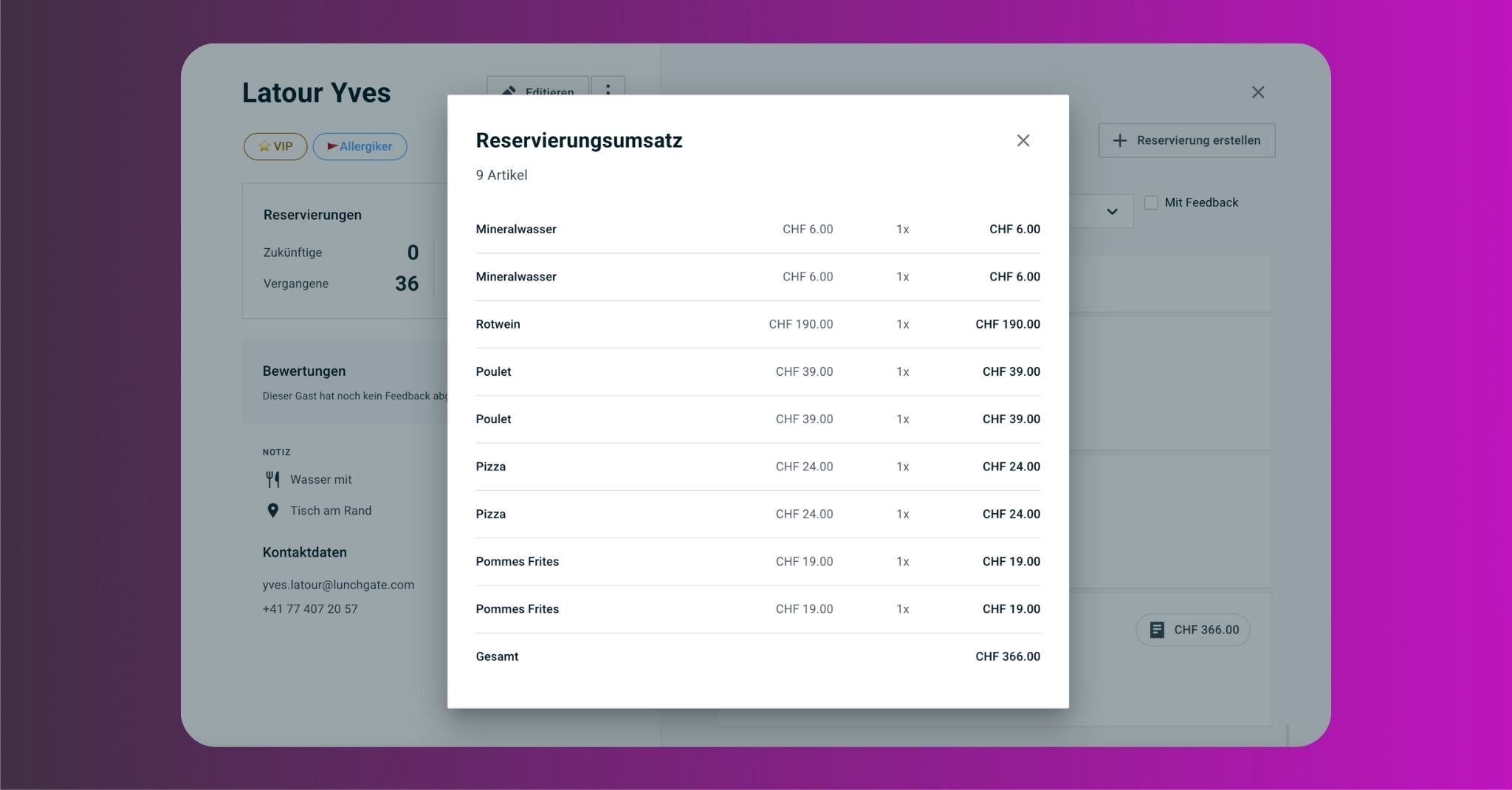
With a POS integration you can see not only a guest's total revenue, but also the details of their consumption.
In the guest profile, you can track which items were consumed during a visit. This can help you, for example, to better identify which dishes or drinks a guest orders regularly.
This merges reservation and consumption data directly within the guest profile.
E. What happens after payment?
Once the bill has been fully settled in the POS system, the table is also automatically released in foratable.
This keeps your floor plan up to date without your service team having to manually manage the table in both systems.
Combining Caller ID and POS integration
When using Caller ID, you can identify which guest is calling as soon as the phone rings.
If the guest is already in your CRM, their existing profile will open. There, you can view their reservation history as well as revenue and consumption data visible through your POS integration.
If no guest profile exists yet, you can create a new CRM entry directly from the call and then proceed to make a reservation.
Caller ID and POS integration complement each other perfectly: Caller ID helps you identify the guest, while the POS integration enriches their profile with information from their restaurant visits.
Activate POS integration
If you would like to connect your POS system to foratable, you can find available providers and integrations in our Marketplace. You can request your desired integration directly from there.
Our Customer Success Team will then be happy to assist you with the setup. In a brief joint call, we will guide you through the setup process and ensure that the integration is correctly connected.